Capybara Mart is a farming game set in the adorable world of capybaras. You play as a capybara, performing various farming tasks to serve customers.
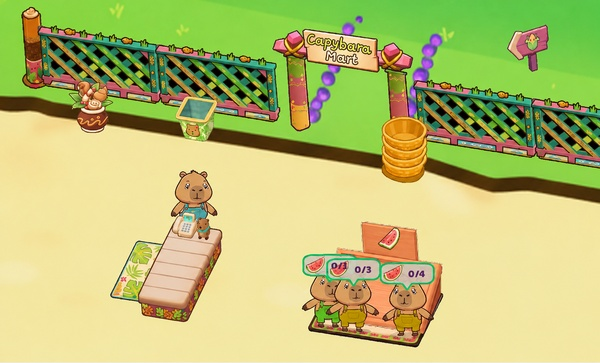
Unlike Farm Day Farming Offline Games, Capybara Mart immerses players in a colorful farm world where the adorable capybara is the central character in all activities. From the initial small garden to the shop and production areas, everything is designed in a fun and relaxing cartoon style.
Players can see the capybara busy planting crops, harvesting produce, caring for livestock, and delivering goods to the shop to serve customers. The combination of cute characters, a vibrant environment, and everyday activities makes the world of Capybara Mart enjoyable, suitable for those who love lighthearted simulation games.
The farm development process in this game goes through the following stages:
The journey in Capybara Mart begins with a modest-sized garden. Players need to utilize available areas to create their first source of produce, then bring the produce to the store to sell to customers.
The money earned from business becomes a crucial resource for farm development. Instead of focusing on making money in the short term, you need to continuously invest in production areas and the store to improve operational efficiency.
The upgrade system is one of the elements that helps Capybara Mart maintain a sense of progress. Important upgrades in the game include:
Each upgrade directly benefits the farm's operations. For example, expanding land increases production, adding shelves allows the shop to hold more products, while upgrading movement speed helps the capybara complete tasks more quickly.
Along with that, the number of products and customers gradually increases, making management tasks more diverse.
You need to ensure that the areas always have enough products for the shop to operate continuously. Moving between the farming, livestock, and sales areas becomes a familiar part of the gameplay, creating a moderately busy feeling without being overly stressful.
Players directly control the capybara to move between areas on the farm to perform tasks.
The simple controls allow players to quickly get used to them, and easily move back and forth between the production area and the shop to keep the farm running.